How to Build Your Own Newsletter Using Resend with Zero Cost
I already had a blog running on Astro v6. It served static pages fast, had a clean content pipeline for MDX posts, and cost me nothing beyond the domain. What it did not have was a way for readers to say “let me know when you write something new.”
I used to think running a newsletter meant signing up for ConvertKit or beehiiv and paying a monthly fee for a second dashboard. But the blog was already there. The writing workflow was already there. All I needed was a delivery mechanism.
So I built the newsletter into the blog — using only what was already there, plus Resend’s free tier. Here’s how it works.
What I Needed
Three things:
- A way for readers to subscribe — double opt-in, because I do not want to send unsolicited mail.
- A way to confirm subscriptions — stateless, no database to maintain.
- A way to broadcast new posts — automatic, so I do not forget to tell people.
The Stack
- Astro v6 — static site with a few SSR routes for the API.
- Resend Free Tier — 3,000 emails a month. More than enough.
- jose — JWT signing for confirmation tokens. No server-side state.
- GitHub Actions — daily cron job that checks for new posts and sends broadcasts.
- Vercel — hosts the Astro site and runs the SSR routes.
Subscription: Double Opt-In Without a Database
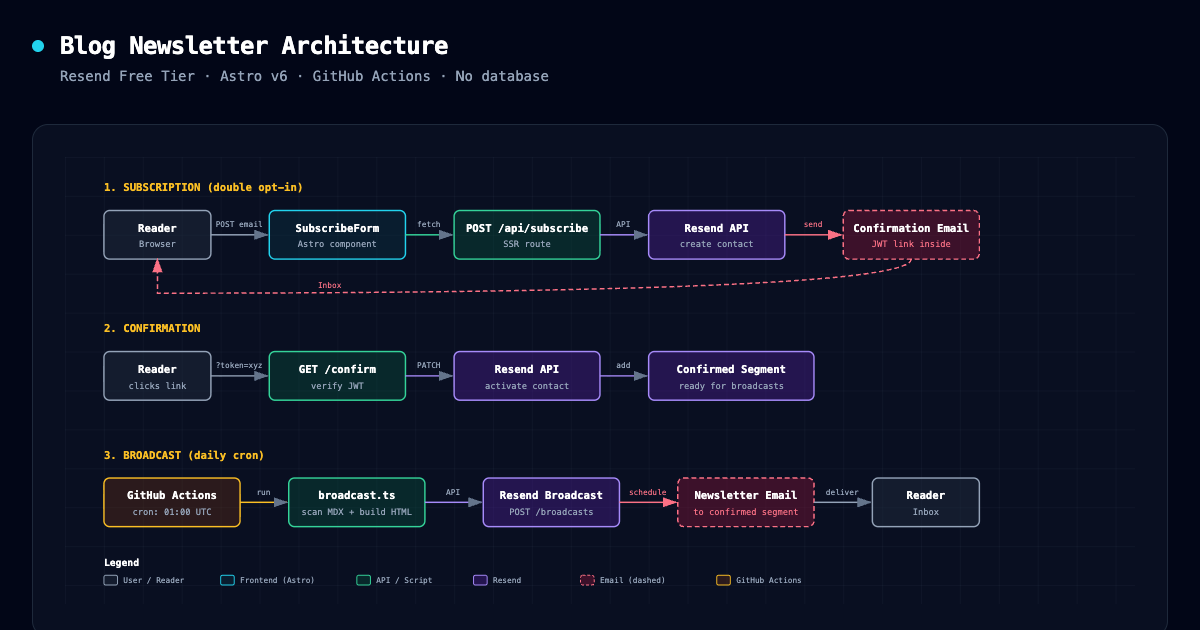
The subscribe form lives at the bottom of every blog post. When a reader submits their email:
POST /api/subscribecreates the contact in Resend withunsubscribed: true.- It signs a JWT containing the email address.
- It sends a confirmation email with a link:
/confirm?token=...
When the reader clicks that link, /confirm (a server-side Astro route) verifies the JWT, flips unsubscribed to false, and adds the contact to a Resend segment called “Confirmed Subscribers.” Then it redirects to /confirmed with a simple message.
No database. No session store. The JWT carries all the state, and Resend’s audience API carries the contact list.
// The entire confirmation flow
const email = await verifyConfirmationToken(token);
await activateContact(email); // PATCH unsubscribed=false
await addContactToSegment(email); // Add to confirmed segment
Broadcasting: A Cron Job That Reads My Blog
Resend’s free tier includes broadcasts. The trick is knowing when to send one.
I wrote a Node script (scripts/broadcast.ts) that runs inside a GitHub Action every morning at 01:00 UTC (09:00 Malaysia time):
- Scans
src/content/blog/**for MDX files. - Checks frontmatter
dateagainst today’s date. - Skips anything already recorded in
broadcasts.json. - For each new post, creates a Resend broadcast using the confirmed subscribers segment.
- Schedules the broadcast to send in one minute.
- Records the post ID in
broadcasts.jsonand commits it back to the repo.
The GitHub Action needs only three secrets: RESEND_API_KEY, RESEND_FROM_EMAIL, and RESEND_CONFIRMED_SUBS_SEGMENT_ID. No external services, no webhooks.
# .github/workflows/broadcast.yml
on:
  schedule:
    - cron: "0 1 * * *"
The script also supports --dry-run, so I can test it locally without sending anything.
The Email Design
Both the confirmation email and the newsletter broadcast use the same HTML table layout. I kept it simple: warm paper background, serif typography matching the blog, a single call-to-action button, and an unsubscribe link handled by Resend’s {{{RESEND_UNSUBSCRIBE_URL}}} variable.
No external email templates. No drag-and-drop builder. Just HTML in a string.
What Cost?
Nothing so far. Resend’s free tier covers up to 1,000 contacts with unlimited broadcasts — more than enough for a personal blog. At my current subscriber count and posting frequency, that is years of runway.
If I ever outgrow it, the options are simple: Resend’s paid plan starts at $40 for 5,000 contacts, or I can export the list and move to a dedicated platform like ConvertKit. The subscribers live in Resend, and the broadcast logic lives in code I control, so migrating is just a CSV export and an API swap.
The Trade-Offs
This is not Buttondown or ConvertKit. There is no analytics dashboard. No open-rate graphs. No subscriber tagging beyond the one segment. I do not need those yet. When I do, I will add them — or I will migrate.
I also chose a daily cron job over commit-triggered broadcasts. On every push, I could scan for new posts and send immediately — but that would be noisy if I publish multiple posts in a day, or if I push edits that do not warrant an email. A fixed daily check keeps the cadence predictable. Readers get one digest-style notification, not a flood.
Why This Feels Right
A newsletter is just a notification layer on top of a blog. The blog is the source of truth. The newsletter is a delivery mechanism. Building it this way keeps the signal clear: write first, notify second.
And because everything runs on free tiers and open-source tools, the only ongoing cost is the domain — which I was already paying for.